Exploring Sales App extensions
Customize Sales App with extension points in the cart, product detail page, and menu.
This feature is in beta, and we're working to improve it. If you have any questions, please contact Support.
VTEX Sales App provides extension points in the cart that let you customize the user experience and interface to meet your store requirements.
The available extension points for Sales App are:
| Extension Point | Category | Description | Layout shift |
|---|---|---|---|
cart.cart-list.after | Cart | Render content after the full cart item list and before the bottom of the cart page. | No |
cart.cart-item.after | Cart | Render content below each cart item row. | Yes ⚠️ |
cart.order-summary.after | Cart | Add components below the order summary on the cart page. | Yes ⚠️ |
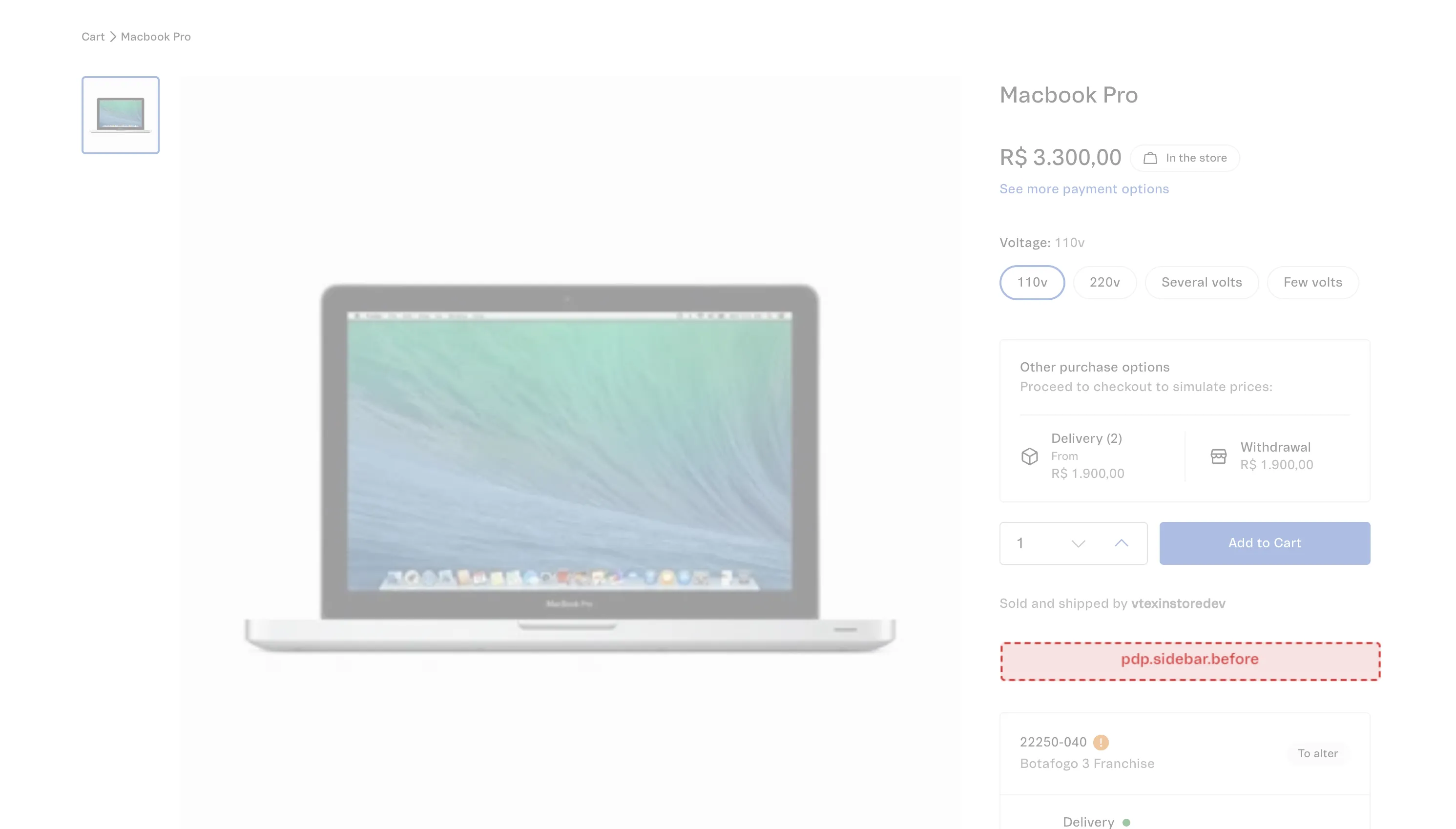
pdp.sidebar.before | PDP | Render content at the top of the product detail page sidebar, before the default purchase and shipping content. | Yes ⚠️ |
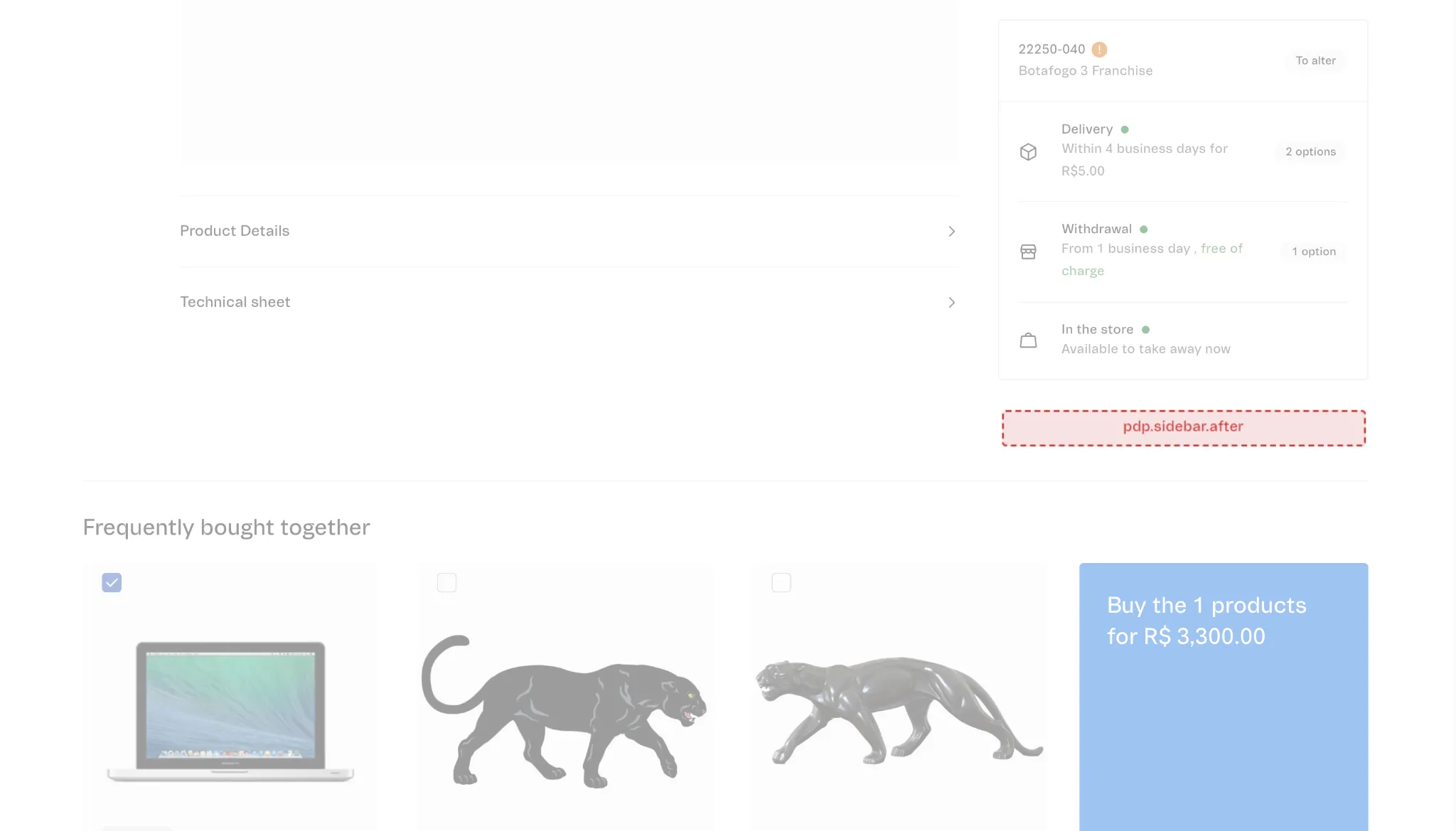
pdp.sidebar.after | PDP | Render content after the product detail page sidebar. | Yes ⚠️ |
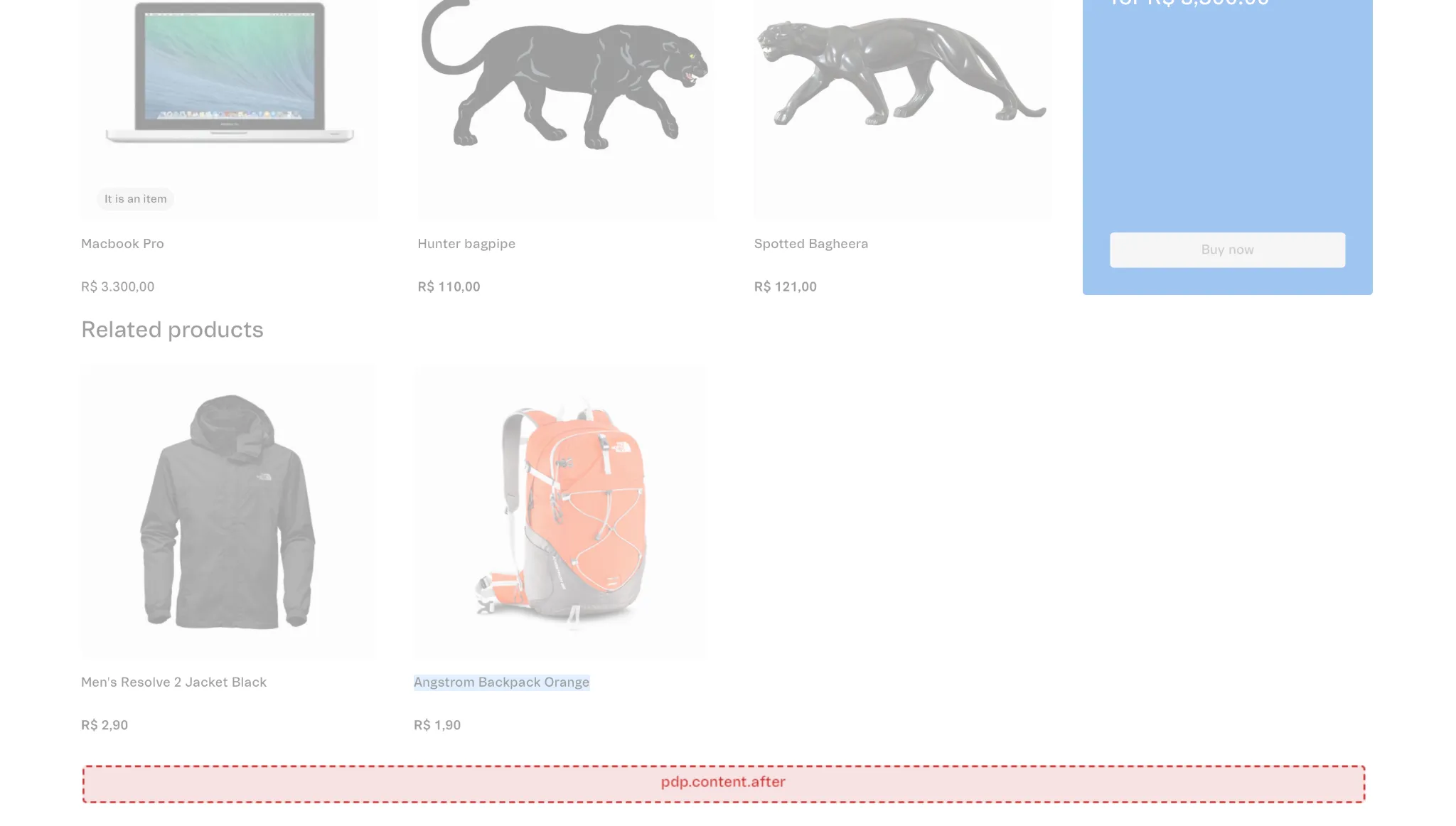
pdp.content.after | PDP | Render content below the main product detail page content, after sections such as related products or frequently bought together. | Yes ⚠️ |
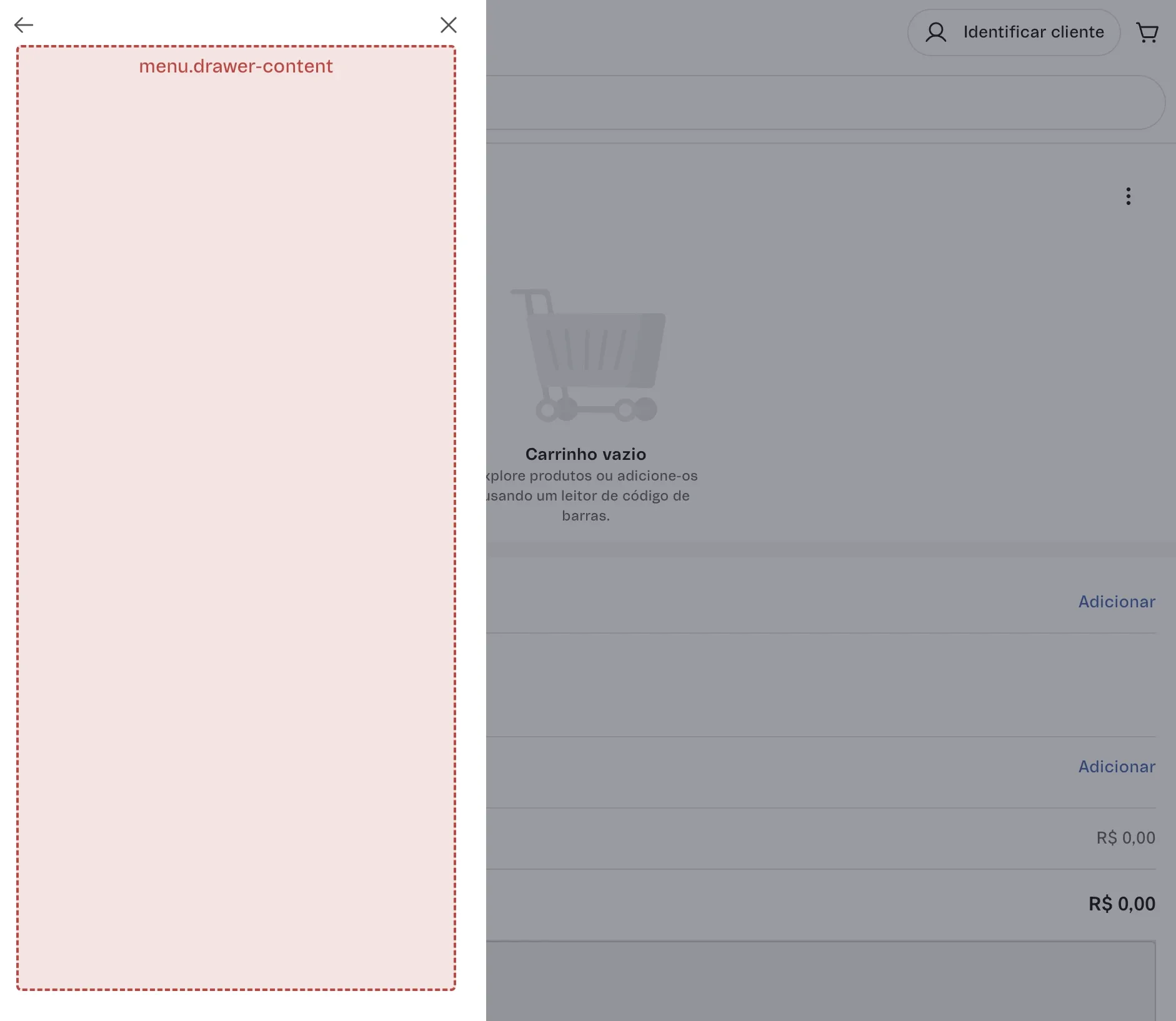
menu.item | Menu | Add a custom tile to the Sales App side menu. | No |
menu.drawer-content | Menu | Define the content shown in the drawer opened from your menu.item tile. | No |
Some extension points may trigger layout shifts. If your extension fetches data, reserve space in the area where the extension renders so the layout remains stable while the content loads. Use skeletons or loading states to improve the user experience, especially in extension points where layout shifts may occur. Static extensions and extensions that use only data-layer hooks shouldn't cause layout shifts because VTEX Sales App renders them consistently within the layout.
The following sections describe each extension point in more detail. For the full list of available hooks and types for building your extensions, see Sales App extension hooks and types.
Cart extension points
Use the following cart extension points to customize different areas of the cart experience.
cart.cart-list.after
Use this extension point to render content after the entire cart item list and before the bottom of the cart page. It's ideal for cart-level messaging such as cross-sell components, store policies, or trust and security notices that apply to the whole order.
- Available hooks:
useCart,useExtension - Layout shift: No. VTEX Sales App reserves this area in the layout, so static and data-layer-only components render without moving surrounding content.

cart.cart-item.after
This extension point renders immediately below each cart item row, allowing you to attach item-specific content such as warranties, services, item badges, or custom delivery details for that product.
- Available hooks:
useCart,useCartItem,useExtension - Layout shift: Yes. Components that fetch remote data or change height over time can cause nearby elements to move. Reserve vertical space and implement loading states or skeletons to keep the cart stable while data loads.

cart.order-summary.after
Use this extension point to append components under the order summary on the cart page, such as financing simulators, loyalty messages, or upsell suggestions based on the current totals.
- Available hooks:
useCart,useExtension - Layout shift: Yes. Because it's adjacent to key actions (like the Continue button), dynamic height changes are noticeable. Pre-allocate space and display skeletons or loading indicators to avoid pushing the summary or primary button while data is loading.

Product Detail Page (PDP) extension points
Use the following PDP extension points to customize key areas of the product detail page.
pdp.sidebar.before
This extension point appears at the top of the PDP sidebar, before the standard purchase and shipping content. It's useful for badges, membership highlights, or store-specific information that should appear near the main buying actions.
- Available hooks:
usePDP,useCart,useExtension - Layout shift: Yes. Content rendered here can change the position of the rest of the sidebar. When fetching data, keep components compact, reserve height, and use loading placeholders to minimize visible shifts.
pdp.sidebar.after
Use this extension point to render content after the PDP sidebar, such as additional services, store pickup programs, or fulfillment-related contextual recommendations.
- Available hooks:
usePDP,useCart,useExtension - Layout shift: Yes. Late-loading data or components that expand can push the sidebar content up or down. Implement skeletons and fixed minimum heights to keep the sidebar visually stable while your extension loads.
pdp.content.after
This extension point is located below the main PDP content area, after sections like related products or "frequently bought together". This is recommended for long-form or secondary content, such as recommendations, promotions, or informational blocks, that don't need to appear near the Buy button.
- Available hooks:
usePDP,useCart,useExtension - Layout shift: Yes. Because it sits near the bottom of the page, vertical movement is less disruptive but still noticeable. Allocate enough vertical space and use loading states when rendering content that depends on external APIs.
Menu extension points
Use the following menu extension points to add custom entry points and flows to the Sales App menu.
menu.item
This extension point adds a custom tile to the Sales App side menu, providing an entry point to your own flow (for example, a loyalty dashboard, financing calculator, or partner app).
- Available hooks:
useExtension - Layout shift: No. The tile is rendered within the existing menu grid, and static labels or icons don't affect the surrounding layout. Keep the label concise so it fits well among other menu tiles.
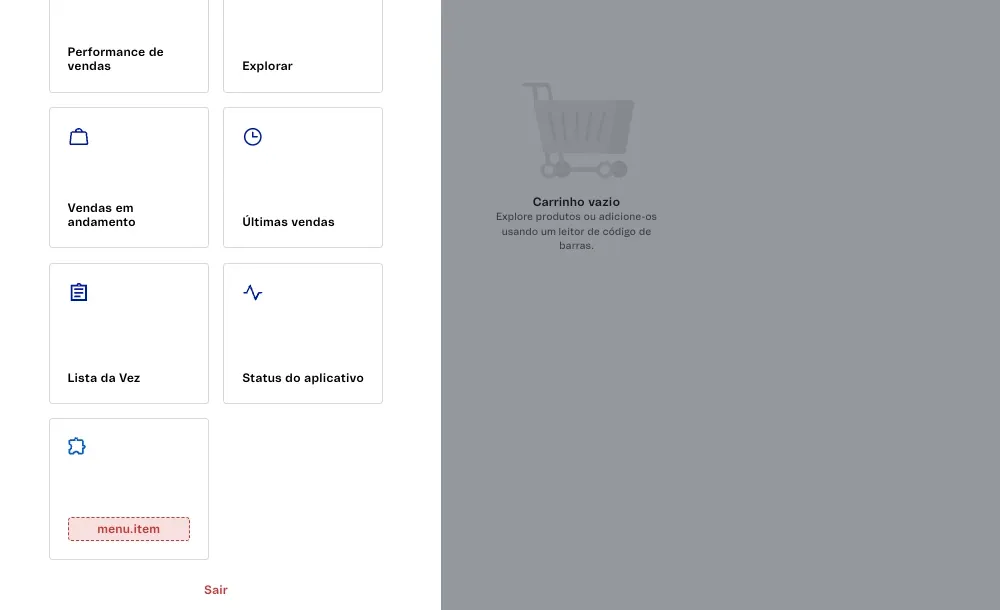
Create a simple component that returns a string within HTML tags, such as div or p.
_10import React from "react";_10_10export function MenuItem() {_10 return <div>Extension</div>;_10}
This component is optional. If you don't create it, a default menu labeled
Extension Pointwill be displayed. The menu will only be visible if you define themenu.drawer-contentextension.
menu.drawer-content
This extension point defines the content of the drawer opened from your menu.item tile, allowing you to build full-screen flows such as forms, dashboards, or multi-step tasks without leaving VTEX Sales App.
- Available hooks:
useCurrentUser,useExtension - Layout shift: No. The drawer area is fully reserved in advance, so rendering dynamic content inside it doesn't move elements on the underlying page. Focus on performance and responsiveness rather than reserving extra height.