VTEX Activity Flow
Get started with Activity Flow, VTEX's Real User Monitoring (RUM) solution.
Activity Flow is the VTEX solution for Real User Monitoring (RUM) that captures and analyzes shopper navigation actions to generate metrics and insights that help improve user experience.
The tool tracks page views and sessions, offering a real-time view of the shopper journey. It captures clicks, views, and impressions to evaluate engagement with the products. Additionally, it assesses Web Vitals performance metrics and analyzes HTTP requests to identify failures that may impact the user experience. When integrated with VTEX Ads, Activity Flow captures ad events, such as impressions and clicks.
Activity Flow also supports add-to-cart and remove-from-cart tracking through the web script data layer plugin. This allows the script to capture cart events across different storefronts and analytics implementations, including stores using Google Analytics Universal (GAU), Google Analytics 4 (GA4), or both.
The web script recognizes common cart event naming conventions, such as add_to_cart, addToCart, add-to-cart, and add_to_cart_v2. When GA4 and GAU are running simultaneously, Activity Flow filters out duplicate cart events, generating a single event per user's cart action.
This guide provides an overview of the Activity Flow architecture and how to get started with its tracking capabilities.
Manual configuration of Activity Flow is only required for headless stores or mobile apps. For setup instructions, see Next steps.
If your store uses VTEX’s native storefront solutions (FastStore, Store Framework, or the Legacy CMS Portal), no additional configuration is needed.
Activity Flow architecture
The Activity Flow architecture is designed to have minimal impact on performance thanks to efficient data handling and task scheduling. It consists of the following stages:
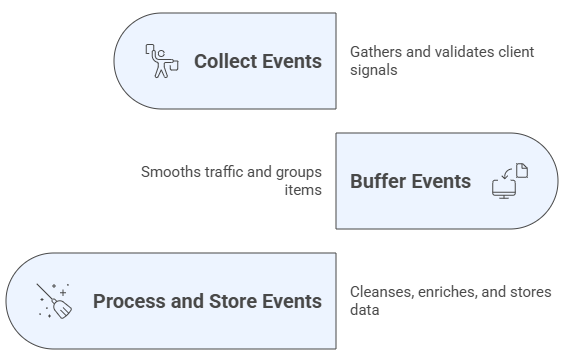
- Collect events: Collects client signals at a backend endpoint, validates them, and routes valid items to durable queues while logging or rejecting malformed submissions.
- Buffer events: Buffers incoming events to smooth traffic spikes and keep processing steady, grouping or streaming items to allow consumers to read them in order without overload.
- Process and store events: Processes buffered data by cleaning, enriching, and deduplicating it, then stores the results in persistent systems to produce query-ready datasets for analysis.
Next steps
Activity Flow is natively installed in all VTEX accounts. To install it in your headless store or in your mobile app, follow the corresponding guide below.