Specification
Understand the required request and response format for integrating external tax calculation services with Checkout, including field specifications and practical examples.
In synchronous integration, VTEX's Checkout API triggers a request to the external tax service API whenever a shopper's cart changes, such as adding or removing items.
To learn more about how to implement a client to connect your tax calculation provider to VTEX's APIs, check the Tax Service recipe and example.
The timeout for the request is five seconds. There is no retry on a timeout. If the external service that responds to the request repeatedly times out, the store won't be able to complete the order. If this integration is active, it applies to all stores in that account.
Tax integration via Checkout API
You must activate the tax integration by configuring the orderForm, an object that stores contextual information about the order. This data is essential to the checkout process of the order.
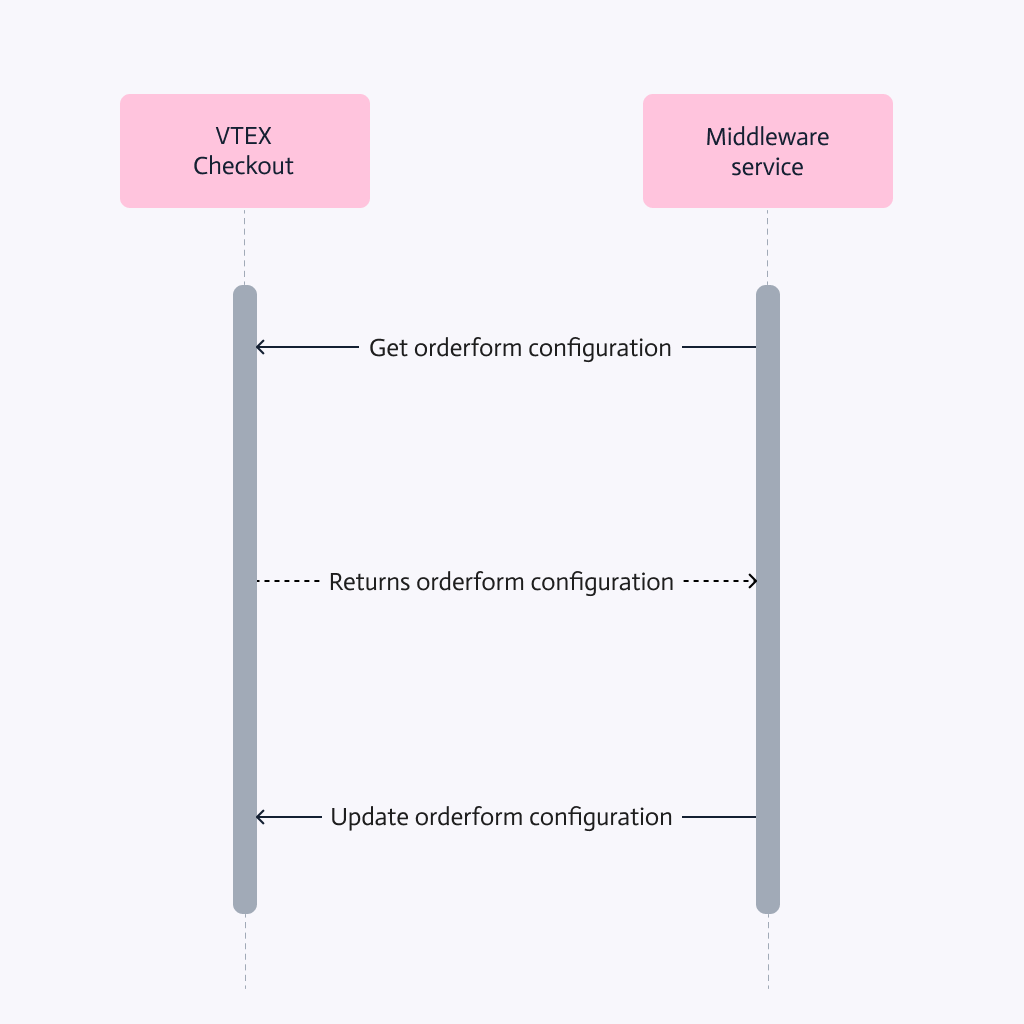
Check the flow of orderForm configuration below:
Get orderForm
To activate the tax integration, first obtain the current orderForm settings using the Get orderForm configuration endpoint.
In the endpoint response, the taxConfiguration object has the tax information that must be updated, as in the example below:
_10{_10 "taxConfiguration": {_10 "url": "https://{accountName}.myvtex.com/tax-service/order-tax",_10 "authorizationHeader": "99b9935b048dfd86893d0bf9gas628849",_10 "appId": "tradeincart",_10 "isMarketplaceResponsibleForTaxes": false,_10 ..._10}
Update orderForm
Then, the Checkout settings must be updated using the Update orderForm configuration endpoint.
In the taxConfiguration object, it is important to update the following fields.
| Property name | Description |
|---|---|
url | String of external API endpoint of the tax provider that the Checkout will query to receive the calculated taxes. |
authorizationHeader | String that the Checkout will use in the Authorization header of calls to the external tax calculation API. This field can be used to define the access credentials for this API. |
isMarketplaceResponsibleForTaxes | Boolean that indicates whether the marketplace is responsible for calculating taxes for the products (true) or if the responsibility lies with the seller (false). |
The
isMarketplaceResponsibleForTaxesfeature isn't compatible with stores that have Multilevel Omnichannel Inventory implemented.
Here is an example of the taxConfiguration object with the expected information:
_10{_10 "taxConfiguration": {_10 "url": "https://sandbox-rest.avatax.com/api/v2/transactions/create",_10 "authorizationHeader": "99b9935b048dfd86893d0bf9gas628849",_10 "appId": "tradeincart",_10 "isMarketplaceResponsibleForTaxes": true,_10 ..._10}
You must send the entire
orderFormin the request body for the Update orderForm configuration endpoint.
After successfully submitting the request, the Tax API integration becomes active in synchronous mode.
When a purchase is made in a store, the location from which the order is shipped matters for tax calculation purposes. Because of this, when items from White Label Sellers are part of an order, tax configuration for the marketplace (
seller 1) is not taken into account for those items. Each seller must have its own tax service configuration in order for this type of integration to function properly.
Tax calculation request
The external tax calculation service must provide an endpoint, such as the https://sandbox-rest.avatax.com/api/v2/transactions/create example, that will receive a POST request. In this request, Checkout provides a body in a specific format. This means that either the endpoint must be prepared to receive this body format, or the integration must contain a parser to adapt it to the correct format.
Here is an example of that body sent by Checkout API:
_102{_102 "orderFormId": "e5098ad8c4jk490bb2f6f03400ac1413",_102 "salesChannel": "1",_102 "items": [_102 {_102 "id": "0",_102 "sku": "26",_102 "productId": "12",_102 "ean": "12345678909123",_102 "refId": "3432",_102 "categoryId": "3",_102 "unitMultiplier": 1,_102 "measurementUnit": "un",_102 "targetPrice": 8.2,_102 "itemPrice": 8.2,_102 "quantity": 1,_102 "discountPrice": 0,_102 "dockId": "1125a08",_102 "freightPrice": 0,_102 "brandId": "2000002",_102 "taxCode": "PC040210",_102 "sellerId": "1",_102 "shippingDestinationId": 1_102 }_102 ],_102 "totals": [_102 {_102 "id": "Items",_102 "name": "Items Total",_102 "value": 820_102 },_102 {_102 "id": "Discounts",_102 "name": "Discounts Total",_102 "value": 0_102 },_102 {_102 "id": "Shipping",_102 "name": "Shipping Total",_102 "value": 0_102 },_102 {_102 "id": "Tax",_102 "name": "Tax Total",_102 "value": 0_102 }_102 ],_102 "clientEmail": "client@email.com",_102 "shippingDestinations": [_102 {_102 "id": 1,_102 "country": "BRA",_102 "state": "RJ",_102 "city": "Rio de Janeiro",_102 "neighborhood": "Botafogo",_102 "postalCode": "22250-905",_102 "street": "Praia Botafogo"_102 },_102 {_102 "id": 2,_102 "country": "BRA",_102 "state": "SP",_102 "city": "São Paulo",_102 "neighborhood": "Moema",_102 "postalCode": "04514-000",_102 "street": "Rua Tuim"_102 }_102 ],_102 "clientData": {_102 "email": "client@email.com",_102 "document": "12345678909",_102 "documentType": "cpf",_102 "clientProfileData": "12345678000100",_102 "stateInscription": "12345678"_102 },_102 "paymentData": {_102 "payments": [_102 {_102 "paymentSystem": "2",_102 "bin": null,_102 "referenceValue": 820,_102 "value": 820,_102 "installments": null_102 }_102 ]_102 },_102 "taxApp": {_102 "fields": {_102 "isTradeIn": "Yes",_102 "productuid": "15216842581",_102 "quoteuid": "29882961591",_102 "condition": "working",_102 "tradeInPrice": "220.00",_102 "title": "ROG Phone II 512GB",_102 "productIdApplied": "404",_102 "uid": "29882961591",_102 "taxBase": "1399.99"_102 },_102 "id": "tradeincart",_102 "major": 1_102 }_102}
This body has the main fields:
| Field | Type | Description |
|---|---|---|
orderFormId | string | orderForm ID. |
salesChannel | string | Sales channel ID. |
items | array | List of objects which are the order products, where dockId is a field that refers to its identification on the Logistics system that contains information of its address. |
totals | array | Total amount of the orderForm, divided into taxes, shipping, discounts, and the item prices. |
clientEmail | string | Client's email address. |
shippingDestinations | array of objects | List of shipping information. Mandatory field. |
clientData | object | Information regarding the client that placed the order. |
paymentData | object | Contains an array of payments, where there is information regarding the order payment. |
taxApp | object | Contains an object with custom fields specific to the tax application. |
Tax provider response to the request
In response to the request sent by Checkout, the external tax provider API is expected to return an array of products, each with its own array of taxes and, optionally, an array of fees. See the example below:
_17[_17 {_17 "id": "0",_17 "taxes": [_17 {_17 "name": "TAX 1",_17 "description": "This tax represents a standard sales tax applied to the item.",_17 "value": 3.48_17 },_17 {_17 "name": "TAX 2",_17 "description": "This tax is a special surcharge imposed by the government for environmental conservation purposes.",_17 "value": 22_17 }_17 ]_17 }_17]
The following JSON represents a list of taxes associated with a particular item, with each tax defined by its name, description, and value:
| Field | Type | Description |
|---|---|---|
id | string | Request item index, which means the SKU's position in the items array sent by the request body. |
taxes | array | List of all the tax types for an SKU. |
fees | array | List of the fees for an SKU, such as regulatory or commercial charges that aren't taxes. Optional. Learn more in Item fees. |
name | string | Tax or fee name that will appear in the checkout. |
description | string | Informative field, which doesn't appear on the storefront. |
value | number | Absolute numeric value that will be added to the original price. |
In the example above, the only item in the items array has a cost of 10, and, including the calculated taxes returned by the tax calculation tool, the total value would be 10 + 3.48 + 22 = 35.48.
If no taxes apply to the items in the order, the expected response is an empty array (
[]).
For the Checkout API to interpret the request body, the Content-Type must be set to application/vnd.vtex.checkout.minicart.v1+json.
Item fees
Besides taxes, the tax provider can optionally return a fees array for each item, at the same level as taxes. Use fees to separate charges that aren't taxes from the fiscal taxes applied to the item.
Taxes are fiscal or government charges that are included on invoices and in tax remittances. Fees are additional charges, usually regulatory or commercial, that shouldn't go through the same fiscal flow. For example, a deposit for returnable packaging that varies by state is a fee, not a tax. Without the fees array, the provider must return this charge as a tax, which adds it to the tax total and results in incorrect fiscal values.
The
feesarray is optional. If the provider doesn't return it, Checkout behaves as it does with taxes only, and existing integrations don't need to change.
When the provider returns fees, Checkout handles them as follows:
- Each fee is added to the item's
priceTagswith theFEE@{name}prefix. Taxes use theTAXHUB@{name}prefix. - The fee values are added to a
Feetotalizer in the cart and order, separate from theCustomTaxtotalizer that adds up the taxes.
Each object in the fees array has the same fields as the objects in the taxes array. See the example below:
_27[_27 {_27 "id": "0",_27 "taxes": [_27 {_27 "name": "STATE SALES TAX",_27 "description": "Sales tax applied to the item.",_27 "rate": 0.04,_27 "value": 0.4,_27 "jurisCode": "36",_27 "jurisType": "State",_27 "jurisName": "NEW YORK"_27 }_27 ],_27 "fees": [_27 {_27 "name": "BOTTLE DEPOSIT",_27 "description": "Deposit for returnable packaging.",_27 "rate": 0,_27 "value": 0.05,_27 "jurisCode": "36",_27 "jurisType": "State",_27 "jurisName": "NEW YORK"_27 }_27 ]_27 }_27]
| Field | Type | Description |
|---|---|---|
fees | array | List of the fees for an SKU. Optional. |
name | string | Fee name that will appear in the checkout. |
description | string | Informative field, which does not appear on the storefront. |
value | number | Absolute numeric value that will be added to the original price. |
rate | number | Rate used to calculate the fee. Optional. |
jurisCode | string | Unique code that identifies the appropriate jurisdiction. Optional. |
jurisType | string | Type of jurisdiction that applies to the calculation. Optional. |
jurisName | string | Name of the jurisdiction that applies to the calculation. Optional. |
In the example above, considering an item that costs 10, the total value would be 10 + 0.4 + 0.05 = 10.45. The tax value (0.4) is added to the CustomTax totalizer, and the fee value (0.05) is added to the Fee totalizer.
Jurisdiction fields
If you use Avalara as your tax calculation provider, response bodies can also include the following fields, which refer to the different jurisdictions that may apply according to location.
| Field | Type | Description |
|---|---|---|
jurisType | string | Type of jurisdiction that applies to the calculation. |
jurisCode | string | Unique code that identifies the appropriate jurisdiction. |
jurisName | string | Name of the jurisdiction that applies to the calculation. |
These fields are also read by Checkout and added to the priceTag.
Below is an example of values that may be contained in these fields, and you can download all the jurisdictions and respective codes used by Avalara.
_41{_41 "Id": "0", _41 "taxes": [ _41 { _41 "name": "NY STATE TAX: NEW YORK", _41 "description": "Srixon Q-Star Tour Golf Balls 5013392- Dozen Yellow", _41 "rate": 0.04, _41 "value": 1.4, _41 "jurisCode": "36", _41 "jurisType": "State", _41 "jurisName": "NEW YORK" _41 }, _41 { _41 "name": "NY COUNTY TAX: ERIE", _41 "description": "Srixon Q-Star Tour Golf Balls 5013392- Dozen Yellow", _41 "rate": 0.0475, _41 "value": 1.66, _41 "jurisCode": "029", _41 "jurisType": "County", _41 "jurisName": "ERIE" _41 }, _41 { _41 "name": "NY STATE TAX: NEW YORK (SHIPPING)", _41 "description": "freight", _41 "rate": 0.04, _41 "value": 0.17, _41 "jurisCode": "36", _41 "jurisType": "State", _41 "jurisName": "NEW YORK" _41 }, _41 { _41 "name": "NY COUNTY TAX: ERIE (SHIPPING)", _41 "description": "freight", _41 "rate": 0.0475, _41 "value": 0.2, _41 "jurisCode": "029", _41 "jurisType": "County", _41 "jurisName": "ERIE" _41 } _41 ] _41}
By following these guidelines and leveraging the provided examples, you can incorporate tax integration into your VTEX platform.