
The Delivery Promise Components app is available only for stores using Delivery Promise. This feature is currently in closed beta, meaning only select customers can access it. If you are interested in implementing it in the future, please contact our Support team.
For more information on setting up Delivery Promise components on Store Framework, see the developer documentation.
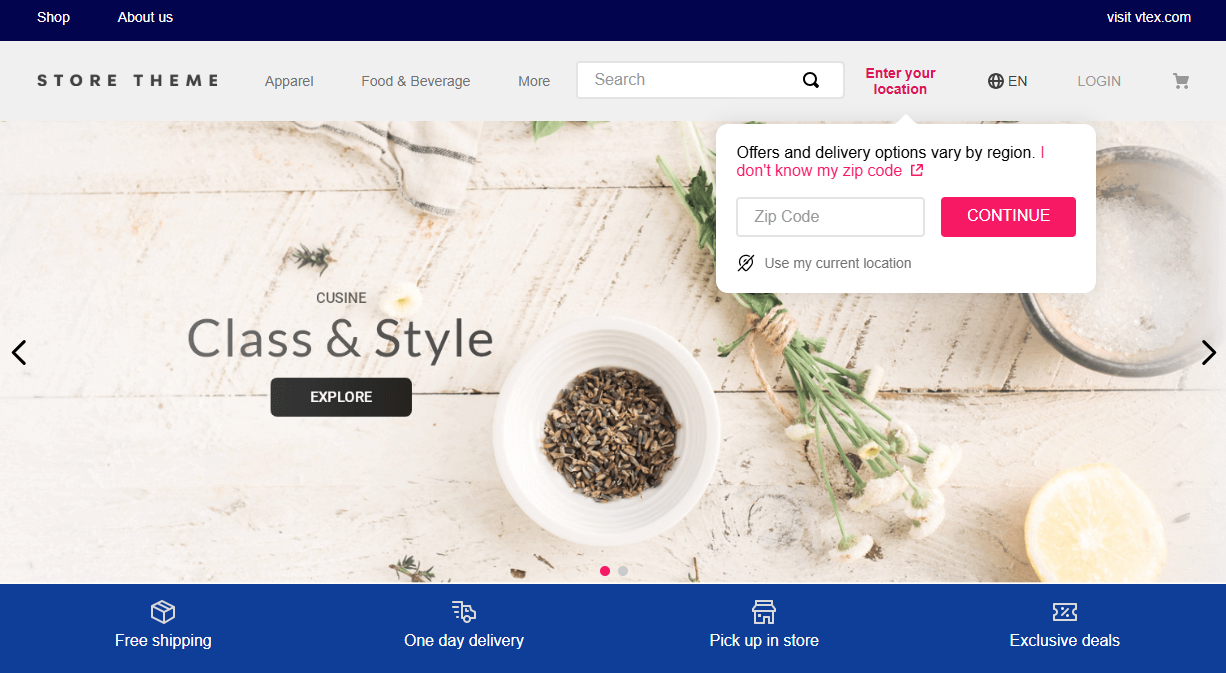
The Delivery Promise Components app exposes blocks that let shoppers set a postal code, choose delivery versus pickup, and pick a pickup point. Shoppers can use geolocation (when enabled) or enter a postal code manually. The store should wrap the theme with DeliveryPromiseProvider (for example via store’s StoreWrapper) so every block shares the same session state.
Merchants control whether postal code and shipping method are optional or required per block. The shopper must have a valid postal code for Delivery Promise to apply; required shipping method blocks keep the method modal open until a choice is made.
Configuration
Adding the Delivery Promise Components app to your theme dependencies
Add the delivery-promise-components app to your theme dependencies in the manifest.json as shown below:
_10 "dependencies": {_10 "vtex.delivery-promise-components": "1.x"_10 }
You can now use all blocks exported by the delivery-promise-components app. Use one instance per block in the theme (no ref-counting; the last mounted block of each type wins if duplicates exist).
| Block name | Description |
|---|---|
shopper-location-setter | Postal code control: popover when optional, blocking modal when required. |
shipping-method-selector | Delivery vs pickup modal (after a postal code exists). |
pickup-point-selector | Pickup point choice (when applicable). |
availability-badges | Product-summary badges driven by delivery promise data. |
Adding blocks to the theme
Place the blocks where you need them (commonly under header rows). Example:
_29"header-row#1-desktop": {_29 "children": [_29 "shopper-location-setter",_29 "shipping-method-selector",_29 "pickup-point-selector"_29 ]_29},_29_29"shopper-location-setter": {_29 "props": {_29 "required": false,_29 "mode": "default",_29 "showLocationDetectorButton": true_29 }_29},_29_29"shipping-method-selector": {_29 "props": {_29 "required": false,_29 "mode": "default",_29 "shippingSelection": "delivery-and-pickup"_29 }_29},_29_29"pickup-point-selector": {_29 "props": {_29 "mode": "default"_29 }_29}
Behavior: reload after postal code, registry, and shipping-method modal
- Reload policy: After a successful postal code update, the app may call
location.reload()when the flow asks for reload. If ashipping-method-selectorblock is mounted withrequired: true, reload is deferred until after the shopper picks a method (session and local state still update without reloading). After the shopper selects delivery or pickup (or resets in flows that reload), the existing reload behavior applies. - UI registry: On mount,
shopper-location-setterregistersREGISTER_SHOPPER_LOCATION_BLOCKandshipping-method-selectorregistersREGISTER_SHIPPING_METHOD_BLOCKwith theirrequiredflags. The hook uses this registry foreffectiveReloadand for coordinating the shipping-method modal. - Opening the shipping-method modal from another block: The context increments
shippingMethodModalRequestIdwhenREQUEST_OPEN_SHIPPING_METHOD_MODALruns—either from the hook after postal code submit (required shipping, location not in the “both required” pair) or fromshopper-location-setterafter CEP completes when both blocks arerequired(see below). Theshipping-method-selectoropens its modal when the id changes and a postal code is present. - Strict sequence when both are required: If both
shopper-location-setterandshipping-method-selectoruserequired: true, the shipping-method modal is not requested at postal-code submit time. It is requested only after a valid postal code exists and the location flow has finished (so the method modal does not stack on top of the postal code modal). - Optional postal code + required method: Once a postal code exists, the shipping-method modal may open automatically. With
required: trueonshipping-method-selector, the modal is non-dismissible untildeliveryPromiseMethodis set.
Block props
shopper-location-setter
| Prop name | Type | Description |
|---|---|---|
required | boolean | If true, blocking postal code modal until valid code. If false, popover flow. Default false. |
mode | enum | default or icon. |
showLocationDetectorButton | boolean | Shows geolocation control in the postal code UI. Default false. |
shipping-method-selector
| Prop name | Type | Description |
|---|---|---|
required | boolean | If true, modal cannot be dismissed until a method is chosen (after postal code exists). Default false. |
mode | enum | default or icon. |
shippingSelection | enum | delivery-and-pickup or only-pickup. |
pickup-point-selector
| Prop name | Type | Description |
|---|---|---|
mode | enum | default or icon. |
availability-badges
No content schema; reads ProductSummaryContext and useDeliveryPromiseState to display delivery promise badges in product summaries.
Global UI
UnavailableItemsModal is rendered once inside DeliveryPromiseProvider (not inside each block).
Optional React exports (e.g. PLP / search)
The default PickupModal block is wired to DeliveryPromiseProvider and session updates. For integrations that need only the UI (controlled zip and pickup list, no UPDATE_ZIPCODE / session side effects), import PickupModalPresentational from vtex.delivery-promise-components. Supporting modules such as pickupSearchClient / pickupInPointPreference are available for fetching pickup points and persisting pickup-in-point preferences in the host app.
Customization
In order to apply CSS customizations in this and other blocks, follow the instructions given in the recipe on Using CSS Handles for store customization.
| CSS Handles |
|---|
shopperLocationSetterButtonLabel |
shopperLocationSetterButtonValue |
shopperLocationSetterButtonWrapper |
shopperLocationSetterContainer |
shopperLocationPopover |
shopperLocationPopoverArrow |
shopperLocationPopoverInputContainer |
shippingMethodSelector |
shippingMethodSelectorLabel |
shippingMethodSelectorLabelLimited |
shippingMethodOptionButton |
shippingMethodOptionButtonSelected |
shippingMethodModalOptions |
shopperLocationDetectorButton |
shopperLocationDetectorButtonContainer |
shopperLocationDetectorButtonIcon |
noPickupPointStateContent |
pickupPointItem |
pickupPointItemSelected |
postalCodeHelpLink |
postalCodeInputClearButton |
postalCodeInputContainer |
shopperLocationPopoverText |
pickupPointIconPath |
pickupPointIconSVG |
pickupPointSelectorButtonValue |
pickupPointSelectorButtonWrapper |
pickupPointSelectorContainer |
shopperLocationPinIconPath |
shopperLocationPinIconSVG |
shopperLocationModalContainer |
shopperLocationModalDescription |
shopperLocationModalSubmitButtonContainer |
unavailableItemsModalContainer |
unavailableItemsModalMessage |
unavailableItemsModalList |
unavailableItemsModalProductItem |
unavailableItemsModalRemoveButtonContainer |
unavailableItemsModalRetryButtonContainer |
updateButtonContainer |
clearButton |
updateButton |