FastStore WebOps: Enhanced security for variables and secrets
WebOps now separates text variables from secrets, enhancing security for sensitive data.
FastStore WebOps users can now better protect the sensitive data of their stores while keeping non-sensitive configuration values easily accessible. The Secrets feature has been enhanced and renamed to Variables and Secrets, allowing you to distinguish between credentials that need protection and public values that should remain visible.
With this update, you can save each entry as either text (non-sensitive) or secret (sensitive), providing enhanced security for API keys and tokens while maintaining easy access to public configuration values.
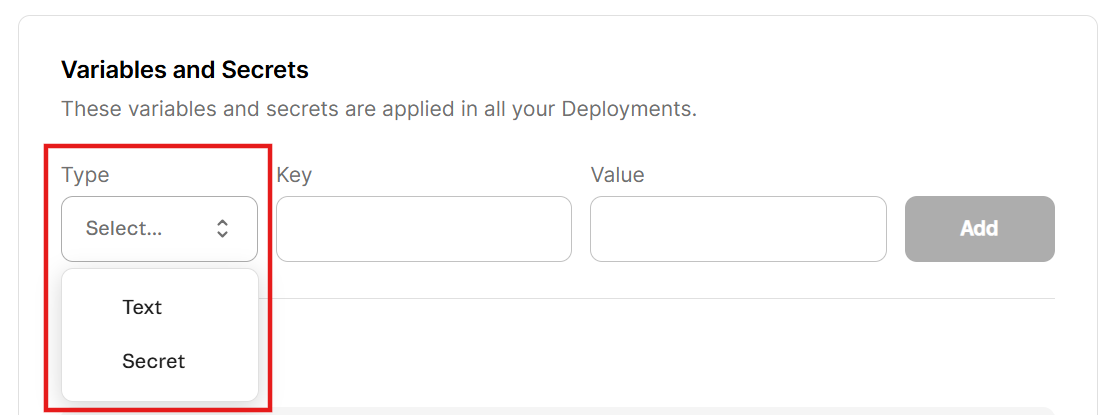
What has changed?
Previously, all values in the WebOps dashboard were managed as Secrets, and every value was treated as sensitive. The interface didn't distinguish between types, and secret values remained visible after saving, increasing the risk of accidental exposure.
Now, the Settings tab in the WebOps dashboard has a Variables and Secrets section, where you can choose between text (non-sensitive, visible after saving) and secret (sensitive, hidden after saving) for each entry.
Why did we make this change?
This change reduces the risk of accidental exposure. The term update from Secrets to Variables and Secrets reflects this approach.
What needs to be done?
Existing entries will be considered non-sensitive values. You can change the type of each entry in the Variables and Secrets section.
To manage variables and secrets, go to your FastStore WebOps dashboard and navigate to the Settings tab.
In the Variables and Secrets section, you'll find the following fields:
- Type: Choose
textfor non-sensitive values that can be viewed later (for example, public URLs), orsecretfor sensitive values that must be hidden after saving (for example, API tokens and passwords). - Key: Define the name of the variable or secret, used as its unique identifier in the environment (for example,
VTEX_API_TOKENorNEXT_PUBLIC_SITE_URL). - Value: Define the content associated with the key, such as the actual token, password, or configuration string used by your application.
For detailed instructions, see the guide Managing variables and secrets.