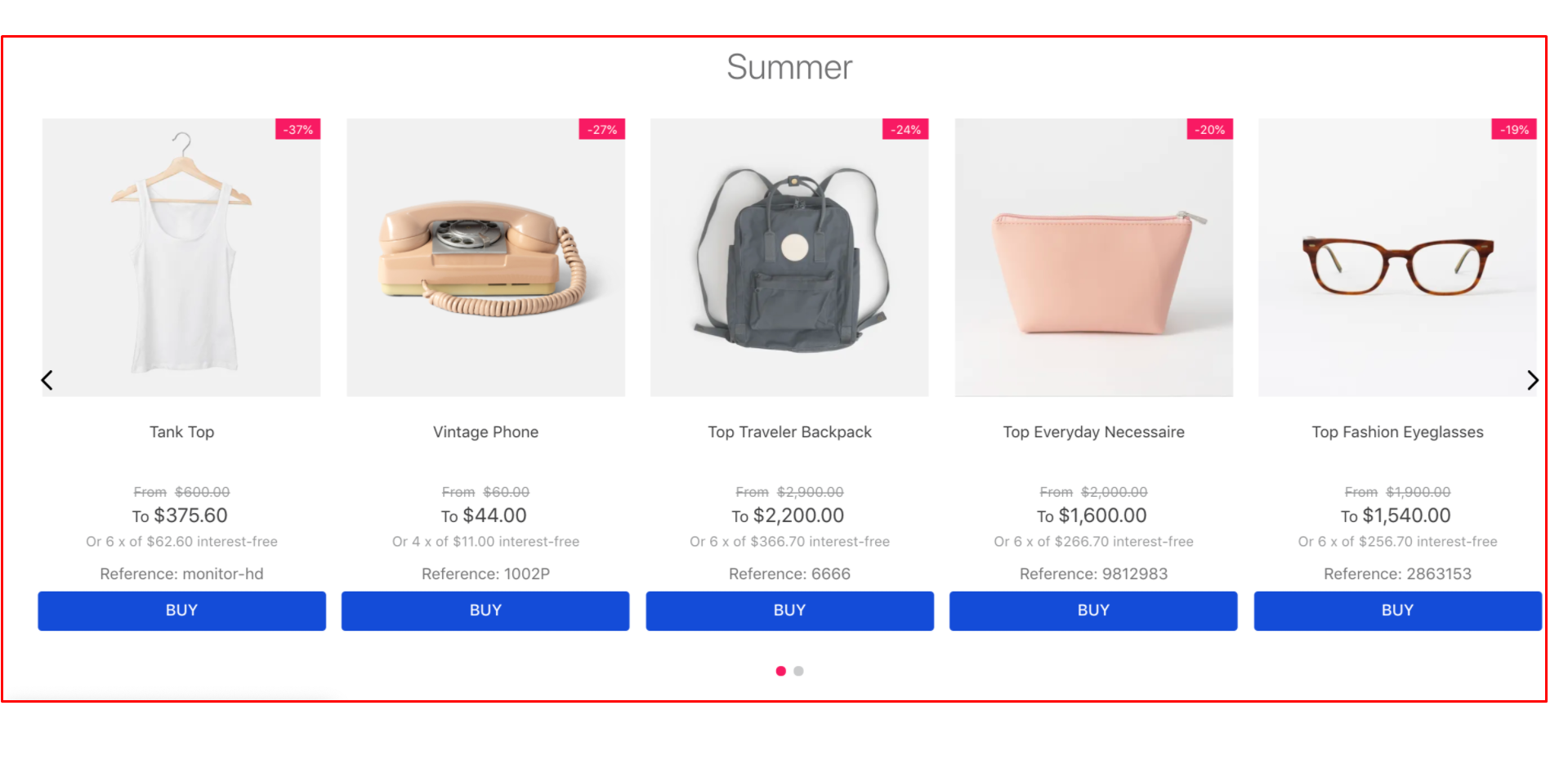
The Product Summary List app (list-context.product-list) creates product lists in VTEX stores. It fetches product data and passes it to the product-summary.shelf block, which renders each product summary.
Use this app to build shelves, product carousels, and other storefront sections that display products.
Installation
- Install the
product-summaryapp in your account by running the following command in your terminal:
_10vtex install vtex.product-summary
Configuration
- Open you Store Theme app in a code editor.
- Open the
manifest.jsonfile and add the Product Summary List app (vtex.product-summary) underdependencies.
_10"dependencies": {_10 "vtex.product-summary": "2.x"_10}
You can now use the list-context.product-list block, which is exported by the product-summary app.
product-list block
Use this block to define the product-summary variation for creating the product list and the desired list-context.product-list, as shown below:
_14 "product-summary.shelf#demo1": {_14 "children": [_14 "stack-layout#prodsum",_14 "product-summary-name",_14 "product-rating-inline",_14 "product-summary-space",_14 "product-summary-price",_14 "product-summary-buy-button"_14 ]_14 },_14 "list-context.product-list#demo1": {_14 "blocks": ["product-summary.shelf#demo1"],_14 "children": ["slider-layout#demo-products"]_14 },
Props
list-context.product-list also runs the GraphQL query that fetches the product list, allowing it to receive the following props:
| Prop name | Type | Description | Default value |
|---|---|---|---|
category | string | Category ID of the listed items. For subcategories, use "/" (example: "1/2/3"). | - |
specificationFilters | Array({ id: String, value: String }) | Specification filters of the listed items. | [] |
collection | string | ID of the product collection to display. | - |
orderBy | enum | Sort order for the items. Possible values are: '', OrderByTopSaleDESC, OrderByReleaseDateDESC, OrderByBestDiscountDESC, OrderByPriceDESC, OrderByPriceASC, OrderByNameASC, OrderByNameDESC. | OrderByTopSaleDESC |
hideUnavailableItems | boolean | Hides unavailable items when set to true. | false |
maxItems | number | Maximum number of items to fetch. | 10 |
skusFilter | SkusFilterEnum | Controls which SKUs are returned for each product. Returning fewer SKUs improves shelf query performance. Possible values are: FIRST_AVAILABLE, ALL_AVAILABLE, ALL. | "ALL_AVAILABLE" |
installmentCriteria | InstallmentCriteriaEnum | Controls which price is displayed when a product has multiple installment options. Possible values are: MAX_WITHOUT_INTEREST, MAX_WITH_INTEREST. | "MAX_WITHOUT_INTEREST" |
listName | string | Name of the list property for Google Analytics events. | - |
preferredSKU | PreferredSKUEnum | Defines which SKU is selected in the summary. Possible values are: FIRST_AVAILABLE, LAST_AVAILABLE, PRICE_ASC, PRICE_DESC. | "FIRST_AVAILABLE" |
SkusFilterEnum
| Name | Value | Description |
|---|---|---|
| First Available | FIRST_AVAILABLE | Best performance, ideal if you don't have a SKU selector on your shelf. Returns only the first available SKU for that product in your query. |
| All Available | ALL_AVAILABLE | It only returns available SKUs. Ideal if you have a SKU selector and want better performance. |
| All | ALL | Lowest performance. Returns all SKUs for each product, including unavailable ones. |
InstallmentCriteriaEnum
| Name | Value | Description |
|---|---|---|
| Maximum without interest | MAX_WITHOUT_INTEREST | Displays the maximum number of interest-free installments. |
| Maximum | MAX_WITH_INTEREST | Displays the maximum number of installments, including those with interest. |
PreferredSKUEnum
| Name | Value | Description |
|---|---|---|
| First Available | FIRST_AVAILABLE | Selects the first available SKU. |
| Last Available | LAST_AVAILABLE | Selects the last available SKU. |
| Most Expensive | PRICE_DESC | Selects the most expensive available SKU. |
To override the
preferredSKUprop, create a product specification and assign the SKU value you want selected by default for each product. If the specification doesn't exist or the value is empty, thepreferredSKUprop is used as a fallback.