Menu
Guides

Release Notes
Release Notes

Slides positioning

Improved
August 14, 2020
1 min read

{"base64":"data:image/png;base64,iVBORw0KGgoAAAANSUhEUgAAAAQAAAABCAIAAAB2XpiaAAAACXBIWXMAAAsTAAALEwEAmpwYAAAAFUlEQVR4nGOIYGC4n+jz/+yGZTryACBEBVKjTZ8sAAAAAElFTkSuQmCC","img":{"src":"https://cdn.jsdelivr.net/gh/vtexdocs/dev-portal-content@main/images/slides-positioning-0.png","width":105,"height":20,"type":"svg"}}

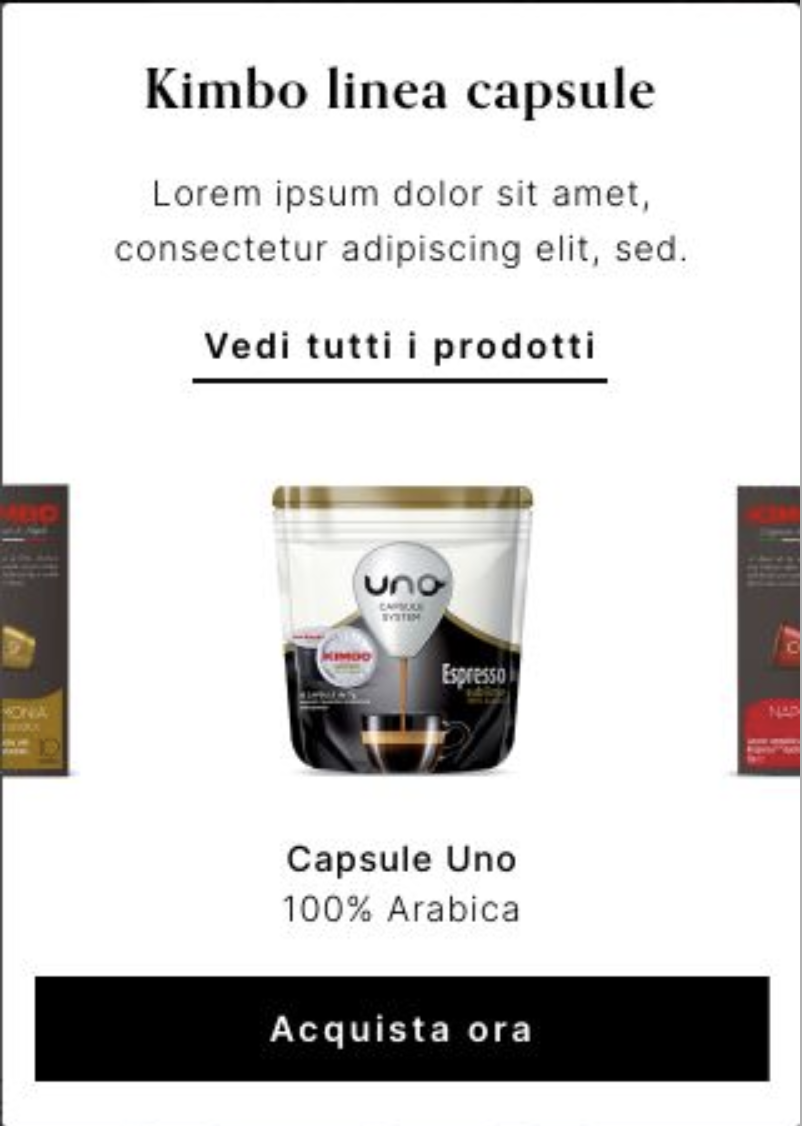
The Slider Layout has gained a new prop called centerMode responsible for defining the slider elements positioning on the screen.

Thanks to it, stores can now display slides whose elements are centered, allowing users to see a peek of the previous and next slides while navigating on the store, as shown in the image below:
{"base64":"  ","img":{"width":802,"height":1126,"type":"png","mime":"image/png","wUnits":"px","hUnits":"px","length":478902,"url":"https://cdn.jsdelivr.net/gh/vtexdocs/dev-portal-content@main/images/slides-positioning-1.png"}}
This improvement is extremely useful in Shelves and other components that use the Slider Layout for rendering product data.

For more details on the new prop, access the Slider Layout documentation.