FastStore WebOps: Rerun failed builds without new commits
FastStore WebOps now lets you redeploy failed builds from the dashboard without creating new commits, helping you fix operational issues faster while keeping your repository history clean.
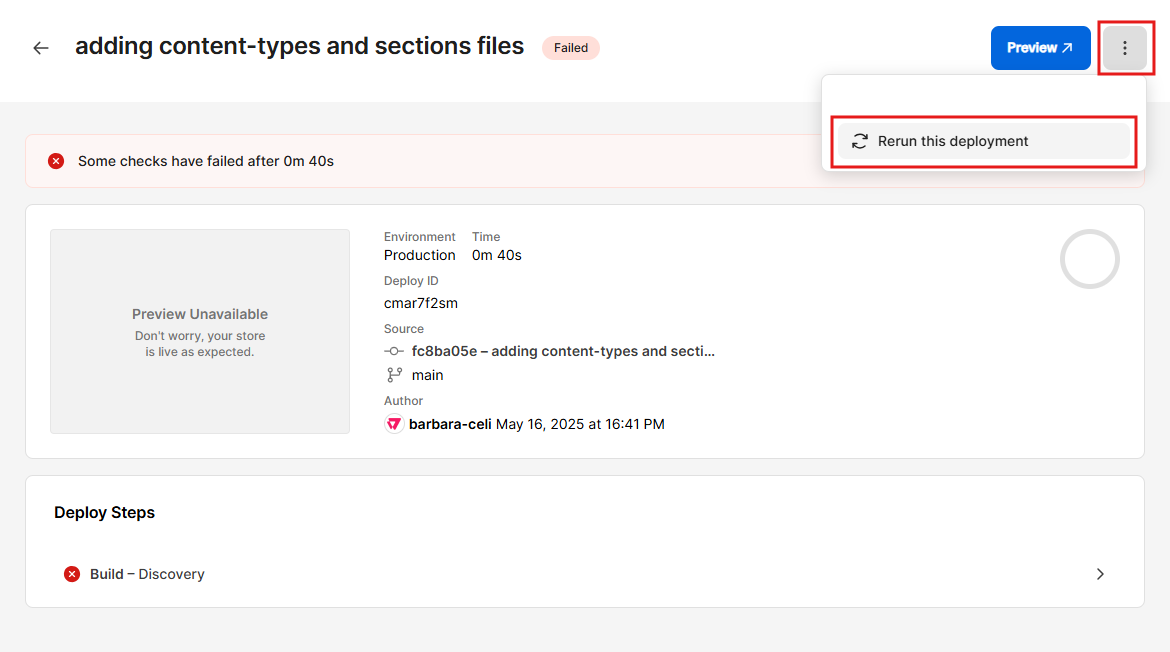
FastStore WebOps now includes a rerun feature for failed builds. This allows you to execute a failed build directly from the WebOps dashboard.
With this feature, you can quickly resolve issues that aren't related to code, such as misconfigurations of environment variables or network interruptions, without creating a new commit in your repository.
What has changed?
Previously, if a build failed due to non-code issues, you had to make a new commit to the repository to trigger a rebuild.
Now, you can rerun the build job from the WebOps interface, fixing operational problems faster without modifying your codebase or affecting your commit history.
What needs to be done?
This feature is available to all WebOps users and no additional configuration is required. To use it, follow the instructions below:
- In the Deploys tab of FastStore WebOps, click the deployment you want to rerun.
- In the top-right corner of the page, click
⋮, then click Rerun this deployment.
If the build failed due to code issues (for example, syntax errors or failing tests), update your code locally and push a new commit. WebOps automatically triggers a new deployment for that commit.