Getting started with VTEX Ads in Store Framework
Learn how to install and configure VTEX Ads to display sponsored products in your store using Store Framework.
VTEX Ads is an advertising solution that enables retailers to display sponsored products throughout their storefront. This guide will walk you through the installation and configuration process to start showing ads in your store built with Store Framework.
The initial installation step is the same for all stores using Store Framework. The configuration process varies depending on your store's search implementation. If you use VTEX Intelligent Search, ads can be integrated seamlessly through the Admin panel and Site Editor. For stores using other search engines, you'll need to implement the ad request flow using either the VTEX Ads API or JavaScript SDK. Learn more in the following sections.
Before you begin
Ensure your store is built with Store Framework to follow the steps in this guide. For other types of storefront technologies, see the VTEX Ads documentation.
Ensure the following apps are correctly installed:
vtex.store@2.xvtex.search-result@3.xvtex.product-summary@2.x
You can run vtex list on the VTEX IO CLI to check if they are installed and their version. If not, run vtex install vtex.{appName}@{version}.
Installing VTEX Ads
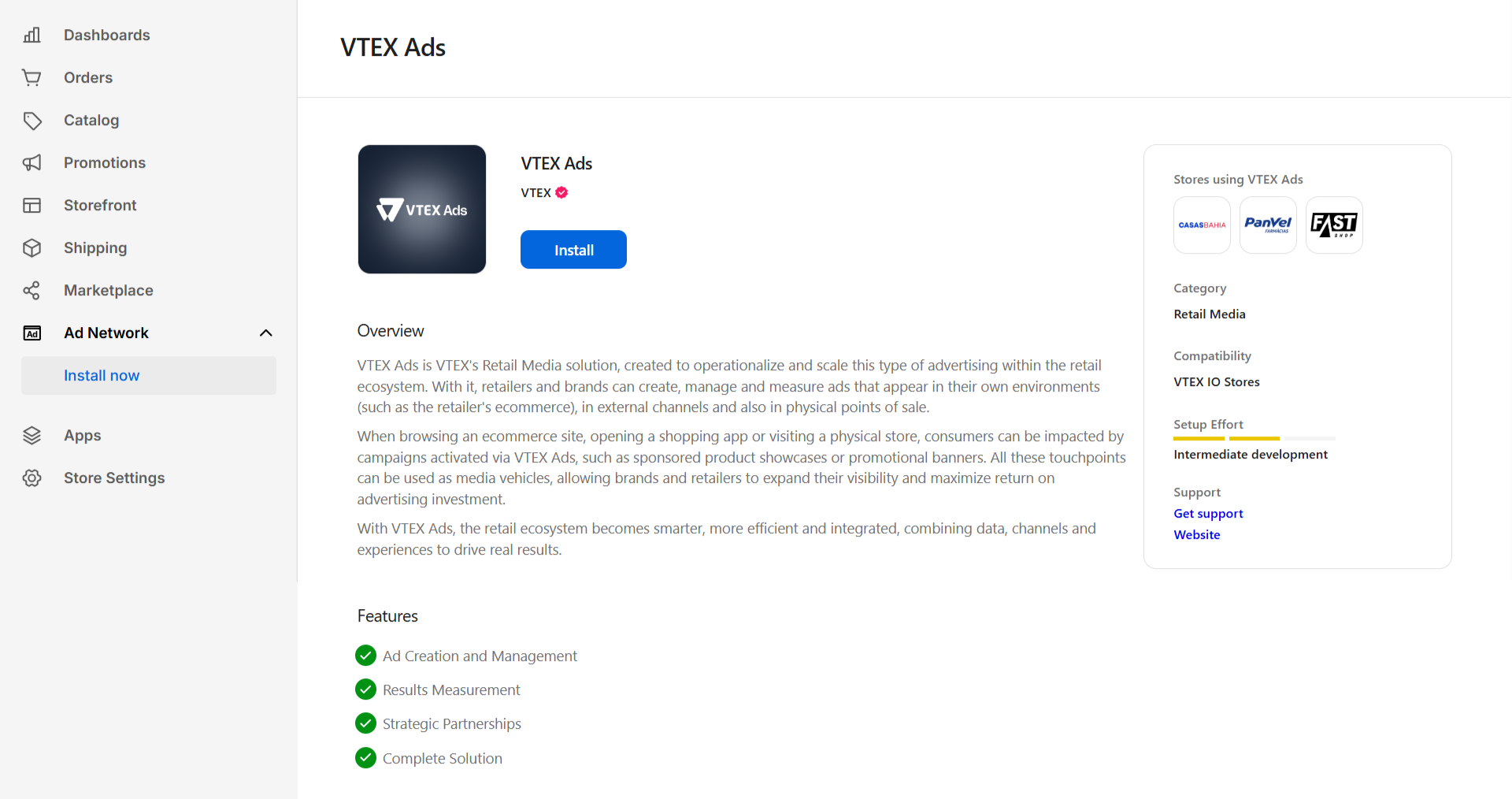
To start using VTEX Ads, you need to install the app through the VTEX IO CLI and complete the setup in your store's Admin panel. Follow these steps:
- Run
vtex install vtex.ads-install@1.xto install the app that adds the VTEX Ads setup page to the VTEX Admin. - In the VTEX Admin, go to the Ad Network section in the left menu.
- Click
Install.
Configuring VTEX Ads
After installing the app, you need to configure your store environment to start displaying ads.
There are two setup paths, depending on whether your store uses Intelligent Search:
- If your store uses Intelligent Search, follow the instructions in Setting up VTEX Ads with Intelligent Search.
- If your store doesn't use Intelligent Search, follow the instructions in Setting up VTEX Ads with other search engines.
Choose the appropriate guide based on your store configuration to ensure proper ad display functionality.
Setting up VTEX Ads with Intelligent Search
If your store uses Intelligent Search, you can configure VTEX Ads directly through the VTEX Admin and Site Editor without additional code implementation. This section covers how to set up sponsored products in search results and product collections.
Sponsored products
Once the Ads app is installed correctly, your store is ready to display sponsored products.
You can configure the number of sponsored products displayed by navigating to Storefront > Site Editor in the left menu.
Locate the component that handles the Search Result component and adjust the Sponsored Count field. The default value is 3.
Learn more about Site Editor.
Product collections
You can create collections on the left-hand menu by going to Catalog > Collections > Create collection. These collections can be used to display ads.
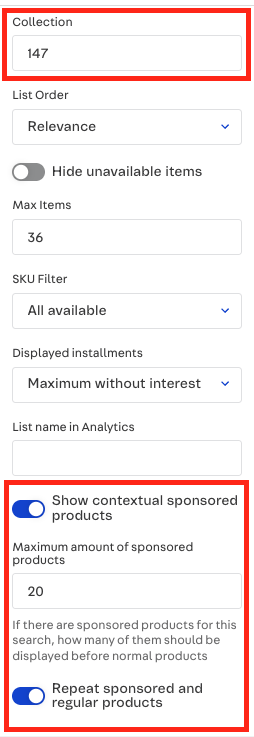
Navigate to Storefront > Site Editor in the left menu. Locate the desired section where the product collection they want to display ads in is located. The following fields can be edited:
- Collection: Must contain the ID corresponding to the collection where sponsored products should be displayed.
- Show contextual sponsored products: Enable or disable the display of sponsored products that are contextually relevant to the collection.
- Maximum amount of sponsored products: Define the maximum number of sponsored products to be shown.
- Repeat sponsored and regular products: Enable or disable the repetition of sponsored and regular products within the collection display.
Setting up VTEX Ads with other search engines
If your store doesn’t use Intelligent Search, you need to implement the ad request flow yourself. There are two options available: using the API or the SDK. For implementation details, please refer to the respective documentation: